Customize Transactional Emails
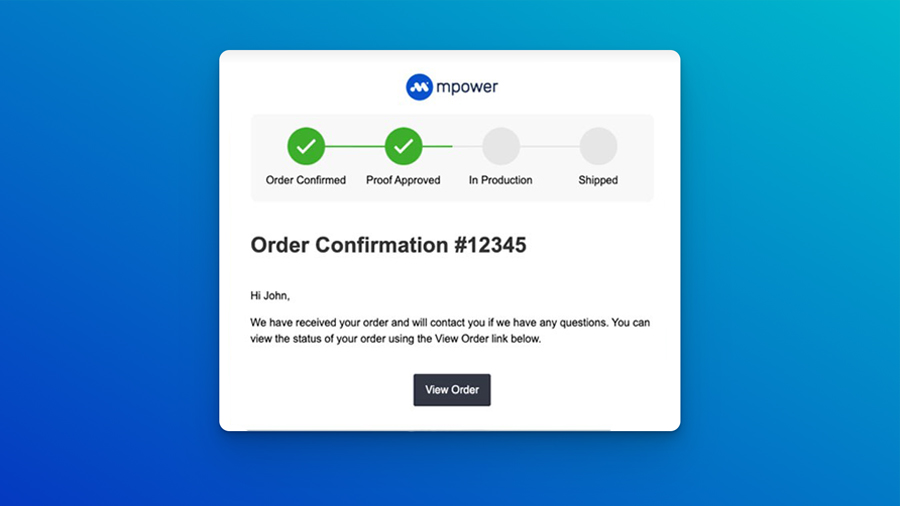
Your Brand, Your Message: Customize Transactional Emails with Ease
We’re excited to announce a powerful new enhancement to the Mpower platform—fully customizable transactional emails!
From order confirmations to shipping updates, your transactional emails are a critical customer touchpoint. Now, you can tailor these messages to reflect your unique brand voice and visual identity, creating a more consistent and professional customer experience at every step of the order process.
What’s New?
You now have full control over the structure and appearance of your outbound system emails. This enhancement allows you to:
- Edit the email layout — Modify headers, footers, and formatting to match your visual style.
- Update the messaging — Write subject lines and body copy in your brand’s voice.
- Customize the design — Add your logo, tweak colors, or even remove elements you don’t need.
- Preview before sending — See exactly what your emails will look like before they reach your customers.
Whether you want to deliver a warm, personalized message or reinforce a sleek, modern brand tone, you can now do it all—directly from the Mpower dashboard.
Where to Access These Settings
All email customizations are managed in the Communication section of the platform, available to admin users. You can adjust default templates, modify email-specific language, and apply changes that will instantly reflect in all future messages.
Why It Matters
Customized emails aren’t just a nice-to-have—they’re a smart way to reinforce trust, build credibility, and stand out in your customers’ inboxes. With consistent branding across every touchpoint, your audience will feel more confident and connected throughout their journey.
Ready to Make It Yours?
Log in, start customizing, and deliver emails that feel just as premium as your products.
Need help or want advice on best practices? Visit our support portal.

