Fewer proof rounds. A record of every sign-off.

Extra proof rounds usually come from vague feedback, a customer looking at an old file, or nobody being sure what changed since last time. Then, months later, someone says they never approved that color. We rebuilt proofing and approval in MPower around those problems: the page your customers see when you send a proof, and the approval history your team sees on every purchase order.
Where the extra rounds come from
Think about the last proof that went three rounds. Odds are at least one of them started with a reply like “can you make it pop more?” or “the logo looks off.” Someone on your team had to guess what that meant, revise and send again.
Version mix-ups cost another round. A customer opens an older email, reviews last week’s file and asks for a change you already made. And when the job finally runs, the only record of the approval is a reply buried in somebody’s inbox.
Email just wasn’t built for approving artwork.
What your customer sees now
When you send a proof from a purchase order, your customer gets a link to a proof page on your own MPower store, in your colors. They don’t need an account. Their name and email are already filled in, and they can edit them before they sign off.
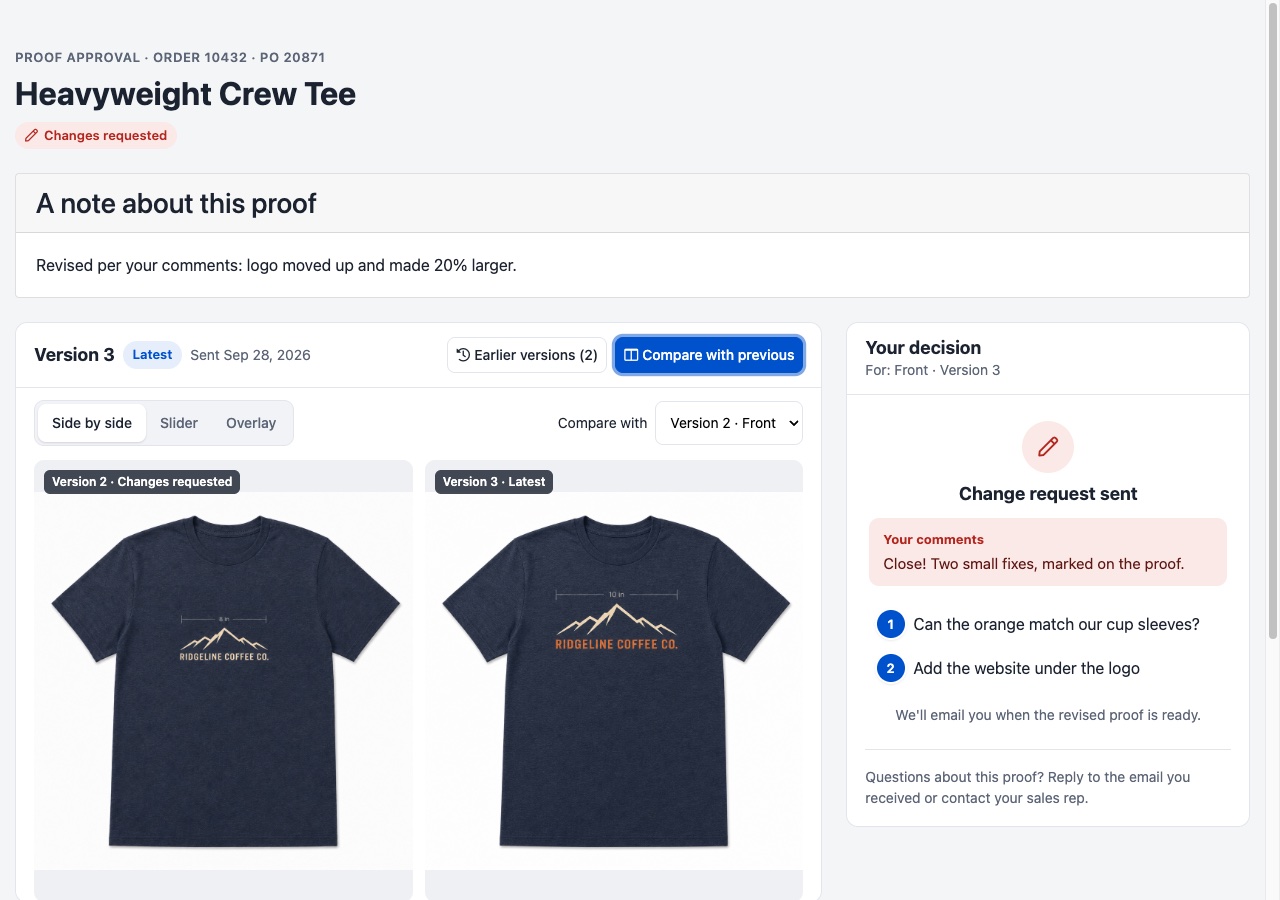
The newest version comes first. Earlier versions are one click away, and each one shows the change request the customer made on it, so they can check the fix before they sign.
Compare with previous puts the new version next to the last one. Customers can switch between side by side, a swipe slider and an overlay. A logo that moved half an inch is hard to spot across two emails and easy to spot in an overlay.
Customers can mark the exact spot. They drop a numbered pin, or drag a box, right on the proof and leave a comment on each one. “Can the orange match our cup sleeves?” pinned to the logo beats a paragraph trying to describe where the problem is.
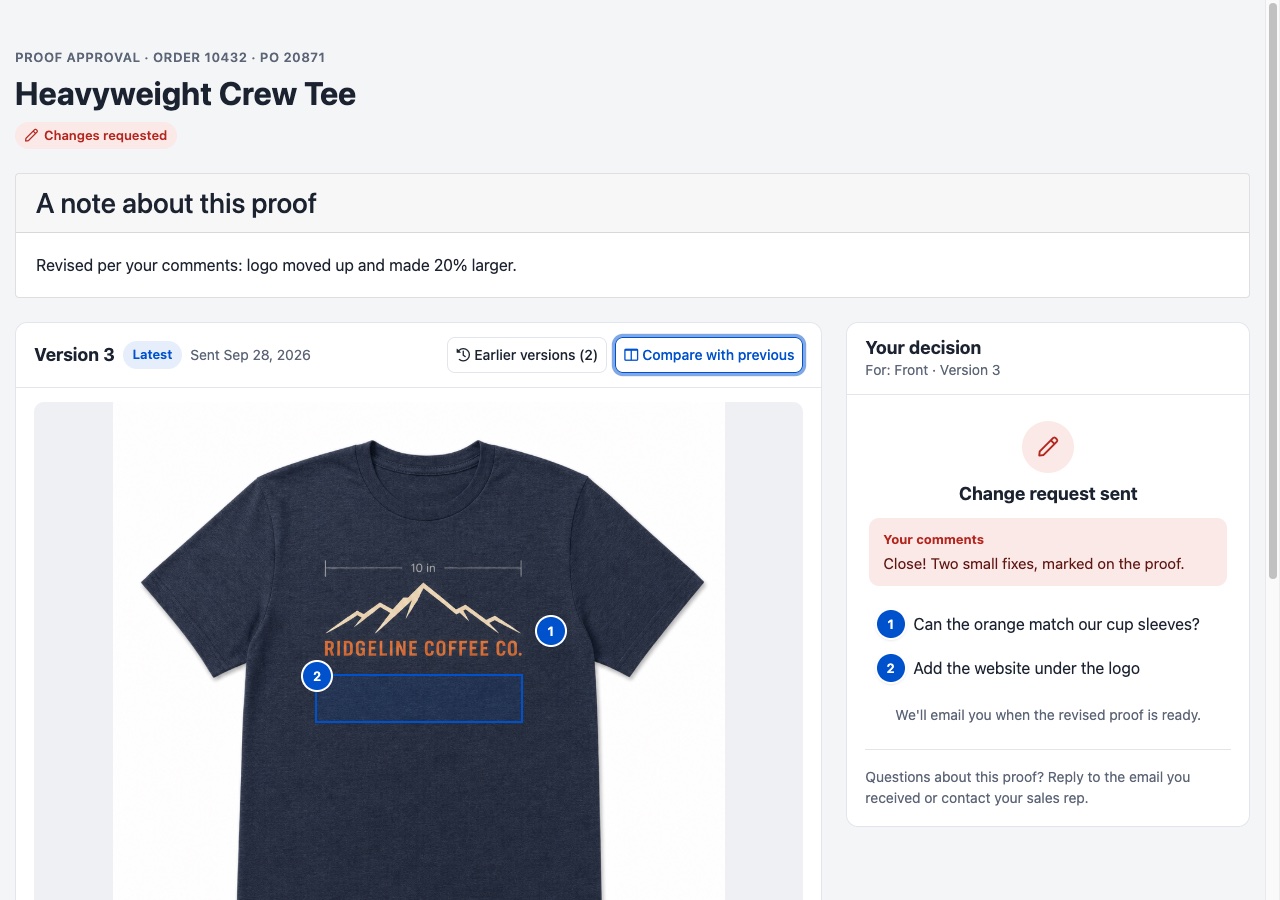
Every decision can carry a comment. Customers can leave a note when they approve. When they decline, a comment is required, so a change request always says what to change.
You can add a note when you send. It shows right above the proof. “Revised per your comments: logo moved up and made larger” saves the customer a game of spot-the-difference.
In your purchase order settings you can add up to eight items, like “Spelling checked” or “Colors confirmed.” Customers tick every item before Approve unlocks. Leave the list empty and they approve without one.
A record of every sign-off
Each purchase order now keeps a timeline of its proofs: when you sent it, when the customer opened it, and who approved or declined, with their comment and checklist answers.
The “opened” entry answers a question every rep has asked: did they even look at it? If a proof went out Tuesday and still hasn’t been opened on Thursday, you know to pick up the phone instead of waiting.
If a job is ever disputed, download the approval record. It’s a one-page PDF with the order and PO numbers, the products, the artwork versions, and every proof event: who, when, their comment and their checklist answers.
Customers can change their mind until the order moves into production. After that, the proof page asks them to contact their sales rep, and your team can still update the proof.
Small things for your team
Copy proof link. Copy a customer’s proof link from the approval history to resend it or share it with a coworker.
Clearer email preview. Check the proof email before it goes out. The preview marks where the customer’s proof link will go.
Full version history. See every version of every artwork on the PO, with the decisions made on each.
Getting started
There’s nothing to switch on. Send a proof from a purchase order the way you do today and your customer gets the new page. If you want a checklist, add it in your purchase order settings before you send.
See how proofing works →
