Gift Cards · All-in-One PRO
Gift cards, under your name.
New on All-in-One PRO. Your customers want to reward employees, thank clients and run incentive programs without picking the swag for everyone. Now your stores can sell gift cards. You choose what they're called, recipients get a code by email, and they spend it on your store.
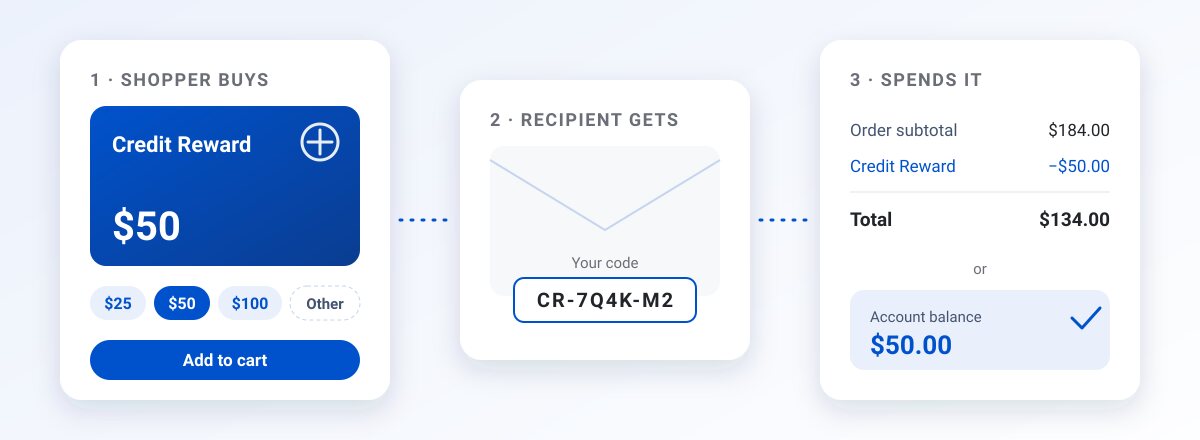
What your customers get
A gift card that carries your name
Shoppers only ever see the name you choose.

Sell it like any product
Set amounts, a custom amount, or both. A gift card is just another product on your store.
Your name for it
Gift Card, Credit Reward, or anything that fits. Shoppers only see your name.

A code in their inbox
Each recipient gets an email with their own code.
Spend it or save it
Enter the code at checkout, or add it to the account balance and spend over time.
What your team gets
The tools to run it

Bulk issue from a spreadsheet
Upload recipients and amounts for a rewards program, event or sales incentive.

Move balances from an old store
Issue codes for balances customers already have.
Adjust a balance, with a reason
Change a balance when you need to, and record why.

One searchable report
Every code, its status and where it was used. Export to CSV, and refund unused codes in a batch.
No double fee
You pay the order fee once
MPower charges no order fee when a gift card is bought. Your plan's order fee applies once, when the card is spent on merchandise.
Turn it on per store
Two steps in MPower
Open your store's Configuration and check Gift cards. Codes, bulk issue and the report live on the store's Gift Cards tab.
FAQ
Questions, answered.
Which plan includes gift cards?
What do shoppers call them?
How do recipients use their code?
Is there a fee when someone buys a gift card?
How do I turn it on for a store?
Ready to run all of promo in one place?
See how MPower replaces your disconnected tools with one platform — from the first lead to the final shipment.
Thanks — you're on the list.
A product specialist will reach out within one business day to schedule your demo.
Download
Never miss a beat. Download our app and work on the go with all the same features as our desktop application.

