Order Confirmation
The page after checkout, finally doing some work.
Thank buyers by name, show where their order is shipping and what happens next, and ask the questions you need answered, all on the page they see right after they pay.
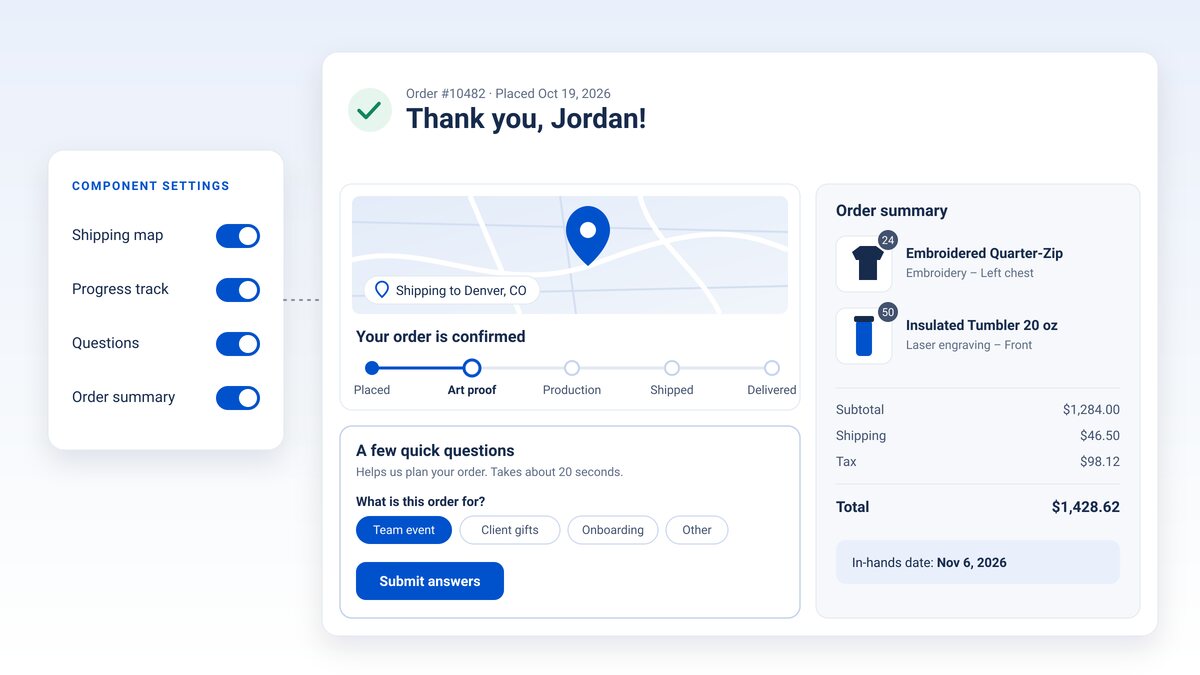
What's on the page
Everything a buyer wants to see after they pay.
Order Confirmation is one page-builder component. It reads the order the buyer just placed and lays it out in five parts.
A personal thank-you
The buyer's first name, their order number and the date they placed it, right at the top.
Shipping map
A map of the ship-to location with a "Shipping to" city and state, so buyers can check the address at a glance.
Order progress
Placed, art proof, production, shipped, delivered. Buyers see the steps ahead and their in-hands date.
Post-purchase questions
An optional card with the questions you set up for the confirmation page. Answers are saved to the order.
Order summary
Each item with its quantity, decoration and sizes, plus subtotal, shipping, tax and total.
Your call, per store
Turn the map, progress, questions and summary on or off for each store, and write your own questions heading.
Post-purchase questions
Ask after they pay, not before.
Every extra field at checkout is one more reason to leave. Move the nice-to-know questions to the confirmation page, where the order is already placed.
- Use the fields you already know. Confirmation questions are order reference fields. Set Where to ask to Confirmation page and they appear here instead of at checkout.
- Pick the right kind of question. Short text, long text, date, checkbox, multiple choice and rating.
- Keep the logic you rely on. Required fields and show-when rules work the same way they do at checkout.
- Answers land on the order. Buyers submit once and can update their answers before they leave the page.
Do it yourself
Add it in a few minutes.
- Open your confirmation page. In MPower, go to Store Editor → Pages and open your store's order confirmation page.
- Add the component. Add Order Confirmation from the Cart & Checkout components and drag it to the top of the page. If the page already has its own thank-you message, remove it so buyers don't see two.
- Choose what shows. In the component settings, turn the shipping map, progress track, questions and order summary on or off, and edit the questions title and subtitle.
- Add your questions (optional). In Store Editor → Carts, open a cart, add a reference field, and set Where to ask to Confirmation page.
- Place a test order. Check out on your store and look over the page you land on.
Or let us do it
We'll set it up for you.
Send us a service request with your store's name and the questions you want to ask. We'll add the component and set up the questions for you.
Submit a service requestNew stores created from an MPower store template already include it.
FAQ
Confirmation page questions, answered.
Is it already on my store?
Stores created from an MPower store template from now on include it at the top of the confirmation page. Existing stores don't have it yet; add it yourself from the page builder in a few minutes, or ask us to.
Does the progress track update as the order moves?
It shows where the order stands when the buyer lands on the page: placed, and then waiting on an art proof if the order is decorated, or in production if it isn't. The later steps and the in-hands date show buyers what comes next.
What if I don't want to ask any questions?
Turn off Questions in the component settings. The card also stays hidden on any store that has no confirmation-page questions set up.
What kinds of questions can I ask?
Short text, long text, date, checkbox, multiple choice and rating. File uploads stay at checkout.
Where do the answers go?
They're saved to the order, alongside the reference fields buyers filled in at checkout.
My store hides prices. What does the summary show?
Items, quantities, decoration and sizes. The price rows stay hidden, the same as the rest of your store.
Make the last page of checkout count.
Ready to run all of promo in one place?
See how MPower replaces your disconnected tools with one platform — from the first lead to the final shipment.
Thanks — you're on the list.
A product specialist will reach out within one business day to schedule your demo.
Download
Never miss a beat. Download our app and work on the go with all the same features as our desktop application.

