All-in-One PRO
Send MPower orders to the tools you already use.
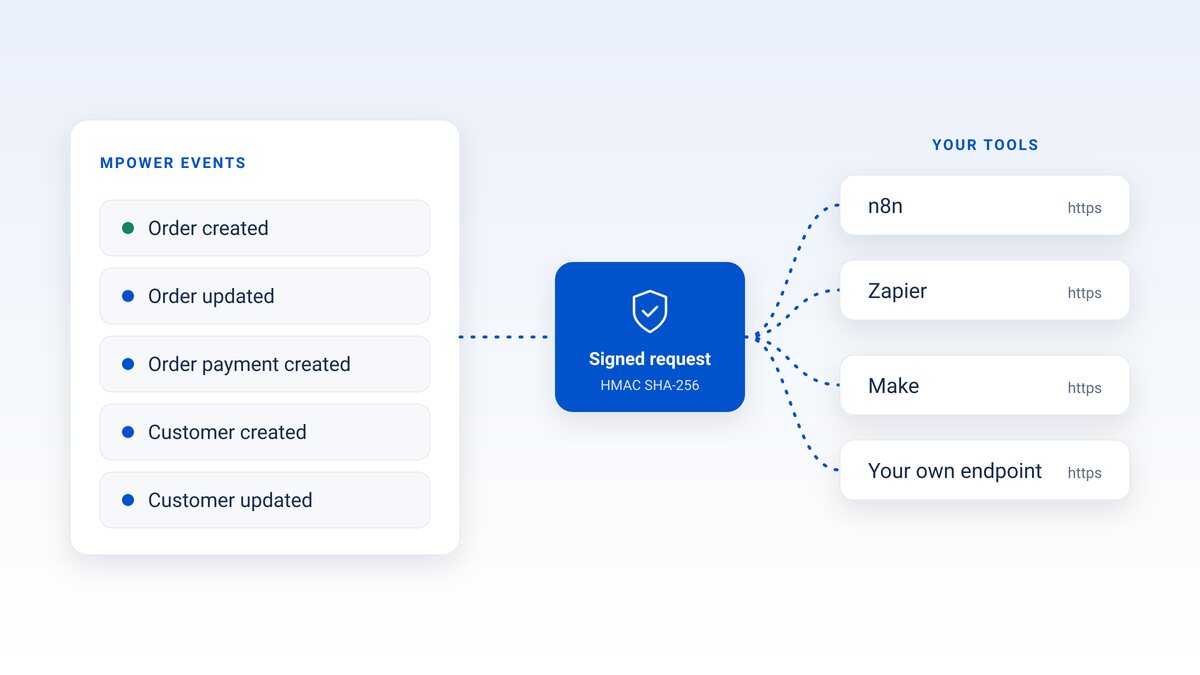
Webhooks are now part of All-in-One PRO. Pick an event, give MPower an https URL, and it sends a signed request every time that event happens. You'll find them in the new Connections tab, next to API tokens and the AI connector.
Connections
Three ways to connect MPower, in one tab.
Open My Distributor → Connections. On All-in-One PRO, all three are included. Connections guide
API tokens
Create tokens for the scripts and integrations that call the MPower API.
AI connector
Connect Claude, ChatGPT or another assistant at https://mcp.mpowerpromo.com/mcp and look up orders and customers in plain English.
Webhooks
MPower calls your URL when an order or customer is created or updated, or when a payment is recorded.
How webhooks work
Set one up in a few minutes.
- Open Connections. Go to My Distributor → Connections and choose Webhooks.
- Pick an event. Order created, order updated, order payment created, customer created or customer updated.
- Paste an https URL. An n8n, Zapier or Make webhook URL works, and so does an endpoint you run yourself.
- Save the signing secret. MPower shows it once, so store it with your other credentials.
- Check the signature. Each request carries an
X-MPower-Signature: sha256=<hmac>header. Verify it with your secret to confirm the request came from MPower.
X-MPower-Signature: sha256=<hmac>- The event id
- When it happened
- The source
- Who made the change
What you can build
Your other systems hear about it right away.
Use n8n, Zapier, Make or your own code. If it accepts an https webhook, it works.
Alert your team
Post a message to your team chat when a new order comes in.
Sync customers
Add new and updated customers to your CRM or email list.
Track payments
Update a spreadsheet or dashboard each time an order payment is recorded.
Run your own code
Point a webhook at your own endpoint and trigger whatever comes next.
Already on PRO
It's in your account now.
Open My Distributor → Connections. API tokens, the AI connector and webhooks are all there.
Not on PRO yet
Upgrade from the same tab.
Starter and All-in-One accounts see what's included in the Connections tab, with an Upgrade to All-in-One PRO button. You can also compare plans on our pricing page.
Compare plansFAQ
Webhook questions, answered.
Which plan includes webhooks?
All-in-One PRO. It also includes API tokens and the AI connector. On Starter or All-in-One, the Connections tab shows what's included and an Upgrade to All-in-One PRO button.
Which events can I send?
Order created, order updated, order payment created, customer created and customer updated. Each webhook listens for the event you pick.
How do I know a request really came from MPower?
Every request has an X-MPower-Signature header in the form sha256=<hmac>. Check it with the signing secret MPower showed you when you created the webhook. The secret is shown once, so save it. How to verify it
What happens if my endpoint is down?
MPower retries a failed delivery up to 3 times.
Does it work with Zapier, n8n or Make?
Yes. Paste the webhook URL those tools give you. Any https endpoint that accepts a request works too.
What does each request tell me?
The event id, when it happened, the source and who made the change.
Do I need a developer?
Not for n8n, Zapier or Make, which give you a webhook URL to paste. To receive requests in your own app, someone will need to build the endpoint and check the signature.
Let MPower tell your other tools what changed.
Ready to run all of promo in one place?
See how MPower replaces your disconnected tools with one platform — from the first lead to the final shipment.
Thanks — you're on the list.
A product specialist will reach out within one business day to schedule your demo.
Download
Never miss a beat. Download our app and work on the go with all the same features as our desktop application.

